Showing posts with label format. Show all posts

Thursday, December 3, 2009

Usb Disk Storage Format Tool

. Thursday, December 3, 2009
0 komentar

Synopsis :

This freeware called USB Disk Storage Format Tool lets you format any USB stick with the desired file system.


In order to make a USB stick bootable, for example to have a backup when the PC crashes, a tool such as USB Disk Storage Format Tool is needed. USB Disk Storage Format Tool views the USB stick like a normal disk drive and then formats the USB stick with the desired file system (FAT, FAT32, NTFS). With NTFS you can also squeeze out more storage, if you turn on the available data compression.

With NTFS you can also squeeze out more storage, if you turn on the available data compression.

You Can Download : Usb Disk Storage Format Tool


Klik disini untuk melanjutkan »»

Thursday, May 21, 2009

Swiss Knive

. Thursday, May 21, 2009
0 komentar

Create, delete partitions and format your IDE hard disk drives in one process.

You Can Download : Swiss Knive

Klik disini untuk melanjutkan »»

Wednesday, December 3, 2008

Restoration

. Wednesday, December 3, 2008
0 komentar

Synopsis :

Restoration is an easy to use and straight forward tool to undelete files that were removed from the recycle bin or directly deleted from within Windows, and we were also able to recover photos from a Flash card that had been formatted. Upon start, you can scan for all files that may be recovered and also limit the results by entering a search term or extension. In addition, it also provides the option to wipe the found files beyond simple recovery. The program is small and standalone, it does not require installation and can also run from a Floppy disk. Restoration works with FAT and NTFS as well as digital cameras cards.

Pros: Standalone, no install needed

Cons: Limited recovery capabilities works with many but not all deleted files; simple interface lack user friendly features.

You Can Dwonload : Restoration


Klik disini untuk melanjutkan »»

Thursday, June 26, 2008

ABest Mobile Video Converter

. Thursday, June 26, 2008
0 komentar

Synopsis :

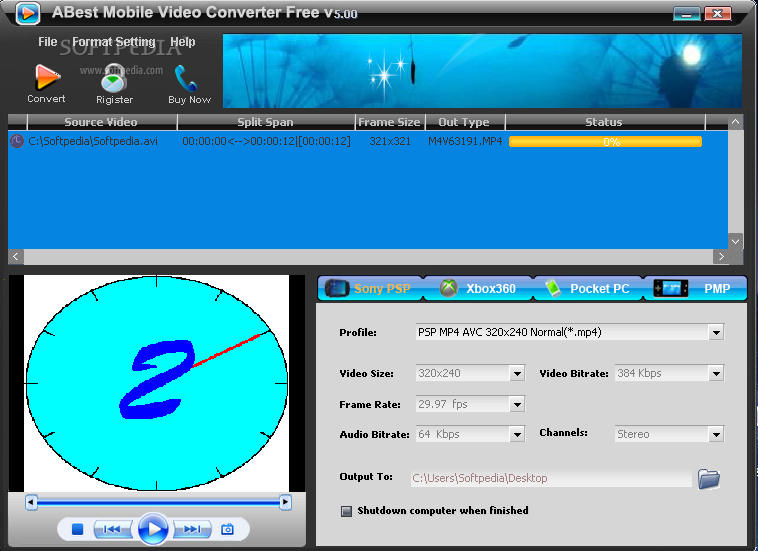
ABest Mobile Video Converter Will allow you to convert videos to other formats, but also to extract audio from video files.

ABest Mobile Video Converter Free is an easy-to-use and all-in-one tool for video conversion, splitting and editing. This application is able to extract audio tracks from video as well as to encode video files from one format to another.

You can also convert video formats to PMP, PSP, PPC and xBox and Image formats. You can also extract audio tracks from video files to MP3, AC3, WAV Audio formats.

Support converting video from AVI, Divx, ASF, WMV, WMA, MPEG, MOV, QT, RM, RMVB, VCD, DVD file to Sony PSP, Microsoft Xbox, Pocket PC, Portable Media Player ect. Mobile video.
· Support converting video from AVI, Divx, ASF, WMV, WMA, MPEG, MOV, QT, RM, RMVB, VCD, DVD file to MP3, WMA, WAV, MP2 Audio .
· Support converting video from AVI, Divx, ASF, WMV, WMA, MPEG, MOV, QT, RM, RMVB, VCD, DVD file to Gif Animation and GIF, BMP, EPS, JPG, PCX, PSD, PDF, TIFF, WMF, EMF, PNG, J2K IMAGE .

Feature :
· Extreme fast Conversion speed
· User-friendly UI with "easy" procedures
· Support batch files conversion
· Specifies start and end position while convert
· Select to automatically shut down your PC after conversion
· No Technical Knowledge Required

You Can Download : Here

Klik disini untuk melanjutkan »»
 

Answer tips

electronics

Blog2Print

OOOwebHost

Free Website Hosting
free portable download is proudly powered by Blogger.com | Template by o-om.com | Power by blogtemplate4u.com